Digital Marketing
General Data Protection Regulation: Better Integration of Google & Facebook
Have you heard about the new GDPR ( General Data Protection Regulation ) coming into effect on 25.05.2018, and wondered if your website is already compliant with data protection laws?
The following article aims to highlight aspects that should be considered when using Google & Facebook tools with regard to the upcoming General Data Protection Regulation (GDPR). Especially if you engage in digital marketing or generally rely on third-party tools or have integrated external resources.
However, with the GDPR, visitors must not only be informed, but their consent must also be obtained.
Let's take the Lower Austria travel portal as an example: Data Protection
This was chosen arbitrarily, but it should make clear that as soon as data protection is concerned, one must always be up to date, otherwise a warning notice could be issued.
Their data protection policy reads very exemplarily, describing the tools and services used. A procedure for opting out of Google Analytics is mentioned and a corresponding browser plugin is recommended. But is that enough? Almost, because in recent months, further recommendations have emerged, especially concerning data flow and suitable opt-out procedures.
Opt-Out in Data Protection Policies
To deactivate Google Analytics, it is already possible to do so via a link. The GDPR now requires clear identification, and of course, the opt-out must happen beforehand, meaning the JavaScript should not have loaded yet. Otherwise, the visitor would already be tracked, and data would thus be sent to Google servers without permission.
USER OPT-OUT FOR GOOGLE ANALYTICS
To achieve this and provide the user with the option to opt out, Google Analytics already includes everything necessary. The “analytics.js” library already contains a method for you to prevent tracking in advance.
window['ga-disable-UA-XXXXXX-Y'] = true;
This must be set to "true" in the "Window" setting before the JavaScript is loaded. When Google Analytics attempts to set a cookie or send data to Google Analytics servers, it checks which setting is enabled.
A relatively simple way to implement this is via the browser's doNotTrack feature – before the Analytics script is loaded, a query is made to check if this setting is enabled in the user's browser, thereby preventing premature loading.
This looks something like this:
<script>
  if (navigator.doNotTrack && navigator.doNotTrack === 1) {
    window['ga-disable-{{'UA-XXXXXX-Y'}}'] = true;
  }
</script>
<script>
  (function(i,s,o,g,r,a,m){i['GoogleAnalyticsObject']=r;i[r]=i[r]||function(){
  (i[r].q=i[r].q||[]).push(arguments)},i[r].l=1*new Date();a=s.createElement(o),
  m=s.getElementsByTagName(o)[0];a.async=1;a.src=g;m.parentNode.insertBefore(a,m)
  })(window,document,'script','https://www.google-analytics.com/analytics.js','ga');

  ga('create', 'UA-XXXXXX-Y', 'auto');
  ga('set', 'anonymizeIp', true);
  ga('send', 'pageview');

</script>
Once this is done, you must ensure that the tag is not loaded beforehand and, in addition, set a corresponding setting for tag sequencing in Google Analytics. This must be done in Google Tag Manager.
There are other ways to prevent loading beforehand, but these would go beyond the scope of this article.
DATA PROCESSING AGREEMENT
Furthermore, you should remember to conclude (if not already done) or renew the contract with Google, the so-called "data processing agreement". Due to the "Safe Harbour" ruling, you should have already done this anyway to be on the legally safe side.
Google provides this contract here.
Speaking of Google, do you use other Google services or perhaps WordPress? Then it's worth taking a look at the fonts used.
Using Google Fonts or Other (Externally Integrated Resources)
Google Fonts are often integrated into websites because they are considered Web Safe Fonts in terms of optimal display across all browsers. What most people often overlook or simply do not know is that the fonts are reloaded via Google servers.
For this to work properly, the browser must send a request to a Google server.
During this request, user metadata is transmitted to Google:
- Browser and version
- Host (website) triggering the request
- User's operating system
- User's screen resolution
- User's IP address
- Language setting
Since this also involves data transmission, this circumstance must be pointed out in the data protection policy. Yes, you read that correctly, Google Fonts can, among other things, be used for tracking.
You now have the option to adapt your data protection policy accordingly or simply download the required fonts from Google Fonts and host them on your own web instance. Problem solved. Do you use a newsletter provider like Mailchimp or Mailjet? Then you will face the same problem, as they also integrate Google Fonts. Of course, this use must also be mentioned in the data protection policy.
Practical tip: How to check if your page has integrated Google Fonts:
This guide applies to Chrome (Windows), but is generally also possible with other browsers.
- Open the website in question.
- Right-click within the website and start the "Developer Mode". Alternatively: Press the F12 key.
- Now switch to the "Network" tab in the newly opened window area.
- Reload the webpage – press the F5 key.
- The resources can now be "filtered" using the filter function; we filter by "Fonts".
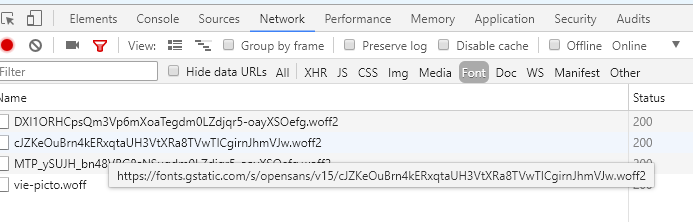
- Now hover the mouse over the various "*.woff2" resources.
- If you see an address (font.gstatic….) as in the screenshot, these are integrated Google Fonts.
Curious about what other information can be retrieved via JavaScript without much effort? Robin Linus's page very clearly illustrates what information your browser reveals via JavaScript: What every Browser knows about you
Facebook Custom Audiences via the Pixel Method
Now let's turn to the blue giant. If you have a Facebook pixel integrated on a website, Facebook can track browsing behaviour for ads. As a site operator, you can track user behaviour through defined "events" and thus display advertising more specifically. For example, if a visitor adds a product (in the online shop) to the shopping cart but does not complete the checkout process, this event is transmitted to Facebook. Through retargeting options, you as the site operator have the opportunity to serve the user with appropriate advertising.
WHAT SHOULD BE DONE – DUTY TO INFORM
You or your clients, as website operators, are obliged to inform website visitors about data collection. The following aspects must be observed:
- Who collects and processes the data (website operator and Facebook)
- Information on the method (product name)
- Which types of personal data are collected or transferred
- Purpose of data processing
- That with the help of this tracking method, identification of the user across numerous websites is possible and an opt-out procedure is available to them
OPT-OUT OPTION – THIS MUST BE IMPLEMENTED ON THE WEBSITE.
Any data flow to Facebook must be able to be stopped using opt-out options. This can be achieved via JavaScript. However, Facebook does not provide this option by default. If you have questions about a suitable JavaScript, please feel free to contact us.
Caution, as we see it repeatedly, a reference to the URL www.facebook.com/settings does not constitute a suitable opt-out method.
You've made it this far and followed all the tips – congratulations! However, the GDPR will bring with it a few more things. One thing is certain, we are far from finished with this and are not yet on the legally safe side. Nevertheless, just drop by here more often – the next blog articles on this extremely exciting topic will follow.