With the help of the Field Validation module, you can quickly configure any number of custom field validations via the Drupal UI. However, if the possibilities provided by the module are not applicable, it is easy to define your own validation plugins. As CTools plugins, these are also exportable and can be easily transferred to other projects.
One of Drupal's great strengths is its excellent Field API, which allows site builders or developers to extend content types or entities in general with metadata as desired. Drupal then takes care of the storage, editing, or display of the saved content. In the Drupal contrib sphere, there are numerous modules that cover various use cases, such as the Address Field module, which handles the storage of address data, or the Date module, which simplifies complex requirements for capturing date content, just to name a few.
Validation is Important
Project requirements are always different, and often it makes sense to implement a custom solution, for example, to use a text field provided by Drupal core for specific data input. However, it is important to validate the field precisely according to the requirements – and that's where the Field Validation module is very helpful.
When the module is activated, the Field UI gets an additional tab where you can assign any number of predefined validation types per field. For example, you can extend a text field so that it only accepts numerical data, and you also have the option to define a minimum or maximum value for the input. The module also offers the possibility to activate validation only for specific roles.
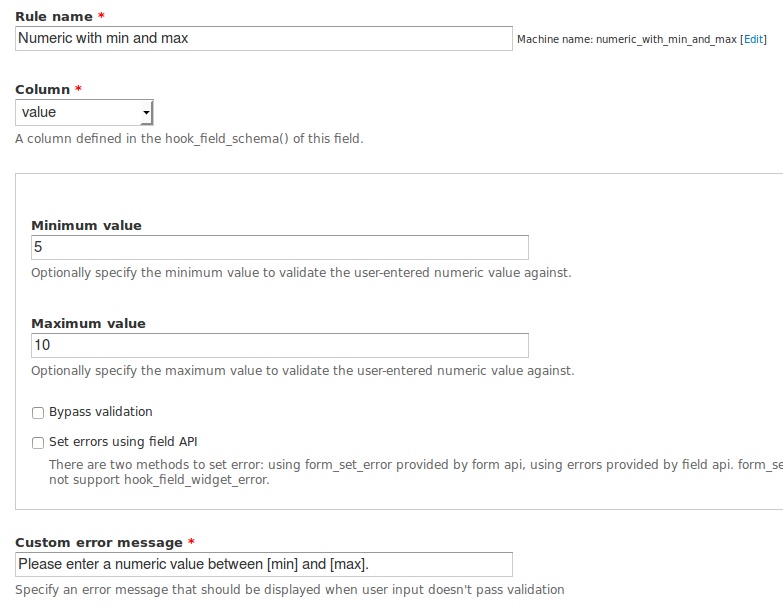
If the user does not enter the data correctly, Drupal prevents validation according to the configured settings:
An overview of the included validation options can be found on the project page of Field Validation. The possibilities are very extensive. However, if they are not sufficient, it is very easy to define your own validation handler in a custom module.
Custom Implementation of a Field Validation
Validation handlers are CTools plugins. First, you need to tell CTools where our plugins are located in the folder structure of our module:
/** * Implementation of hook_ctools_plugin_directory(). */ function MY_MODULE_ctools_plugin_directory($module, $plugin) { if ($module == 'field_validation' && $plugin == 'validator') { return 'plugins/' . $plugin; } }
With this, we can create our plugin in the 'plugin/validator' subfolder of our module. As an example, we will implement a username validation logic, specifically whether the entered value has already been registered as a username in Drupal. The name of our plugin should correspond to the name of the handler. So, we name our file 'field_validation_username_registered.inc' (the path to the file is thus 'plugin/validator/field_validation_username_registered.inc'). First, as with any CTools plugin, comes a short description array:
$plugin = array( 'label' => t('Username already registered'), 'description' => t("Checks if there is a already a user registered with the supplied username."), 'handler' => array( 'class' => 'field_validation_username_registered', ), );
As already mentioned, the name of the handler corresponds to the filename of our plugin. And then we can implement the logic – our handler extends the 'field_validation_validator' class and overrides 2 methods within it:
class field_validation_username_registered extends field_validation_validator { /** * Validate field. */ public function validate() { global $user; if (user_load_by_name($this->value)) { $error_message = t('The name %name is already taken.', array('%name' => $this->value)); $token = array( '[error-message]' => $error_message, ); $this->set_error($token); } }
public function token_help() { $token_help = parent::token_help(); $token_help += array( '[error-message]' => t('Error message that this username already exists.'), ); return $token_help; }
}
The 'validate()' method is the core of our plugin: using the core function user_load_by_name, we ensure that the set_error method of the parent class is only called if user_load_by_name returns a value (in this case, the $user object = this username already exists). Before that, we also define a validation message if this case occurs. With the help of the token_help method, we pass our validation message as a token in the UI.
The Result
That should be it. If we activate the validation on a field, it should already output a message:

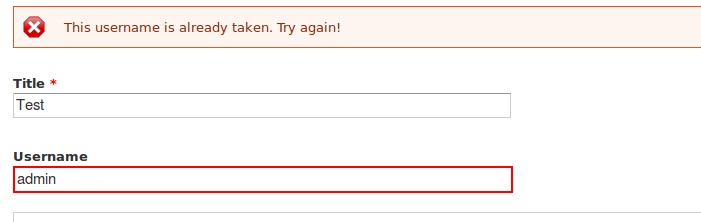
The code we wrote for this is relatively small and clear. Additionally, it can be applied to any field in our Drupal installation. Field Validation plugins, as CTools plugins, are naturally exportable and transferable.